Building a Personal Research Database from Browser Content
Why Academic Researchers Need Personal Databases
You've invested years studying your field. You've read hundreds of papers, articles, and reports. You've attended conferences, collected datasets, and synthesized findings. Yet when you need that specific study about a methodology you explored two years ago, you're back to Google Scholar, hoping the keywords come to you. That knowledge is somewhere in your memory, in your notes, or buried in your browser history. But it might as well not exist.
This is the gap between "having consumed information" and "having a system for retrieving and synthesizing information." Researchers often have the former but not the latter. They rely on fallible memory or random search instead of building systematic access to their research knowledge.
A personal research database solves this. It's your searchable archive of every source you've examined, with context, excerpts, and your annotations. It becomes your extended memory for research.
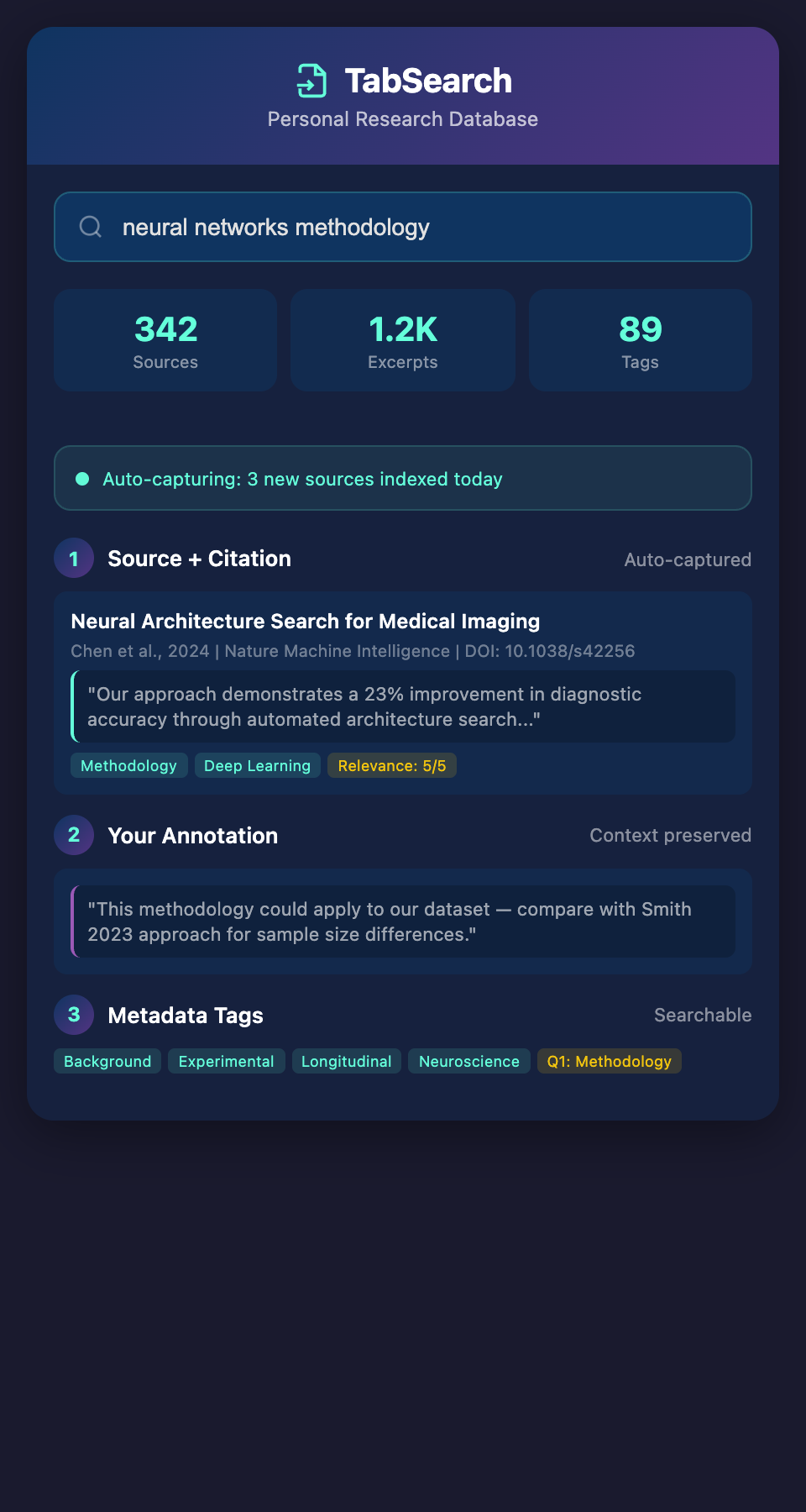
What Your Research Database Must Capture
Before building anything, understand what information matters:
1. The Source
Full citation information: author, date, title, publication, URL. This is the baseline—you need to find the original again. Include the date you discovered it and where you found it (Google Scholar, PubMed, ResearchGate, etc.).
2. The Content
The actual text or the key excerpts that mattered to you. Not summaries—actual quotes or passages. When you return to this source months later, you want to see the exact claim or methodology that was relevant, not your paraphrased memory of it.
3. Your Reaction
Why did this source matter? How does it connect to your research question? What did it make you think about? This is crucial. In six months, you won't remember why a source seemed important. Your annotation preserves that context.
4. Metadata Tags
Categories that make retrieval easier later. These might be:
-
Research phase (background, methods, theory, analysis)
-
Methodology type (longitudinal, experimental, qualitative interview, etc.)
-
Discipline or subdiscipline
-
Research question it addresses
-
Connection to other sources
5. Confidence and Relevance Ratings
How reliable is this source? How relevant is it to your core research questions? A quick 5-point scale (1 = weak source, 5 = foundational) helps you prioritize when you're synthesizing.
Choosing Your Database Platform
Researchers typically have three options:
Option 1: Reference Management Software
Tools like Zotero, Mendeley, or EndNote were designed for academic research. They excel at citation management and bibliography generation. They can store PDFs and notes.
Strengths:
-
Built for researchers
-
Excellent export to citation formats
-
Growing collaboration features
Limitations:
-
Full-text search is weak or nonexistent (you can't search the content of attached PDFs automatically)
-
Finding that one excerpt you remember is difficult
-
Limited ability to search across multiple references simultaneously
Option 2: Note-Taking Systems
Notion, Obsidian, or Roam Research emphasize networked thinking and cross-linking.
Strengths:
-
Powerful full-text search
-
Flexible structure for connecting ideas
-
Forces you to synthesize as you organize
Limitations:
-
Manual entry of information (you're not capturing automatically)
-
Requires discipline and consistency
-
Citations and bibliography generation are afterthoughts
Option 3: Academic Database Tools
Emerging tools specifically designed around research workflows (like ReadCube, Papers, or Paperpile).
Strengths:
-
Integration with browser
-
Some full-text search
-
Citation management + note organization
Limitations:
-
Often subscription-based
-
Limited to PDF papers (doesn't capture web articles, datasets, or non-traditional sources)
Building a Hybrid System
The most effective researchers don't choose one. They build a system combining the strengths:
-
Automatic Capture (browser-based): Everything you open or highlight is captured automatically with a single click or keyboard shortcut
-
Full-Text Indexing: Every word in every source is indexed and searchable
-
Annotation Layer: You can add your thoughts, rate relevance, tag connections
-
Export Integration: When you need citations for a paper, your database exports clean bibliography
This hybrid approach works because it respects your research workflow instead of fighting it:
-
During research: You're reading and discovering. The system captures automatically without requiring you to pause and organize.
-
During synthesis: You search the full index to find connections and patterns.
-
During writing: You export clean citations.
The Core Structure: A Practical Example
Here's how to set this up today with existing tools:
Layer 1: Zotero for References
-
Use Zotero's browser connector to capture sources with one click
-
It automatically extracts metadata (authors, dates, publication info)
-
You can attach PDFs and notes
Layer 2: Zotero Tags and Notes
-
Tag each source with research phase, methodology, discipline
-
Add a note with your reaction: Why does this matter? What surprised you? How does it connect to your question?
Layer 3: Full-Text Search Enhancement
-
Use Zotero's search functionality, which indexes PDFs
-
Keep a parallel Notion database with key excerpts and cross-references for complex connections
-
Create Notion database views for searching by tag, date added, or methodology
Layer 4: Periodic Review and Synthesis
-
Monthly: Review sources added that month, ensure tags are accurate
-
Quarterly: Create synthesis documents connecting sources across multiple papers
-
Annually: Identify gaps in your research knowledge base
Populating Your Database Efficiently
Building a personal research database is worthless if it's empty. Three strategies for rapid population:
Strategy 1: Capture Going Forward
Start capturing from today onward. Within one semester, you'll have 100-200 sources. Within two years of regular research, you'll have 500-1000. This becomes exponentially more useful as it grows.
Strategy 2: Audit Past Research
Go through your previous notes, papers you've written, and old projects. Find the key sources you cited and add them to your database with retroactive annotations. This is tedious but typically takes 4-8 hours and creates immediate value.
Strategy 3: Export from Existing Systems
If you've already been using a reference manager, export everything into your new system. This gives you an instant foundation to build from.
Beyond Simple Organization
A personal research database isn't just organization—it's a thinking tool. As your database grows, search and serendipity become powerful:
-
Search for "methodology + dataset" and discover papers you forgot connected to your current work
-
Look at your most-tagged sources and identify the themes dominating your research
-
Find relationships between papers that cite each other or address similar questions
Researchers who systematize their research knowledge gain a compound advantage. Each new source integrates with existing knowledge instead of standing alone. Connections you might have missed while drowning in individual papers become visible when everything is indexed and searchable.
The Missing Piece
Most research databases require continuous manual entry. You're always behind, always deciding where to file information, always breaking your research flow to organize. The ideal system captures everything automatically—every source you open, every excerpt you highlight—and indexes it all for instant retrieval.
Ready to build your searchable research knowledge base? Join our waitlist for early access to a tool that automatically captures, indexes, and searches your entire research environment.