Managing Multiple Browser Tabs for Academic Research
The Challenge of Scale in Research
Managing a handful of browser tabs is manageable. Managing dozens is an art. Managing hundreds—which some researchers do—requires a system.
PhD candidates and active researchers often keep 75-150 tabs open across multiple windows. Each tab represents a decision point, a lead to follow, a source to evaluate. The challenge isn't remembering that you opened these tabs; it's remembering why, what you found, and where it fits in your research narrative.
Traditional researchers had a tangible advantage: a desk covered with journal stacks, post-it notes, and margin annotations. The physical space constrained the amount you could keep "in flight," which forced prioritization. Digital research has infinite space for open tabs, which paradoxically makes prioritization harder.
Why Your Current System is Probably Failing
Most researchers inherit their tab management approach by accident, not by design. You probably use one or more of these:
The Single Window Approach
All tabs in one window, sorted by creation time (or not sorted). This scales until about 20 tabs, then becomes chaos. Finding anything requires scrolling and hoping the tab preview helps you identify the right one.
The Multiple Window Approach
You open a new window for each research project. This works better but creates a coordination problem: you waste time switching between windows to compare sources across projects, or you duplicate tabs across windows, multiplying your problem.
The Bookmark Folder Scramble
You bookmark tabs intending to organize them later. "Later" arrives when you have 200 bookmarks in a folder called "Research 2024" and you've forgotten the organizational logic you used.
The Tab Suspension Compromise
You use extensions that auto-suspend inactive tabs to reduce memory usage. Your browser doesn't crash, but you've added another layer of friction—you have to un-suspend tabs to view them, losing the quick visual reference of what you have open.
A Scalable Multi-Window Architecture
Instead of fighting your browser's limitations, work with them. Here's a structure that scales to 100+ tabs without collapse:
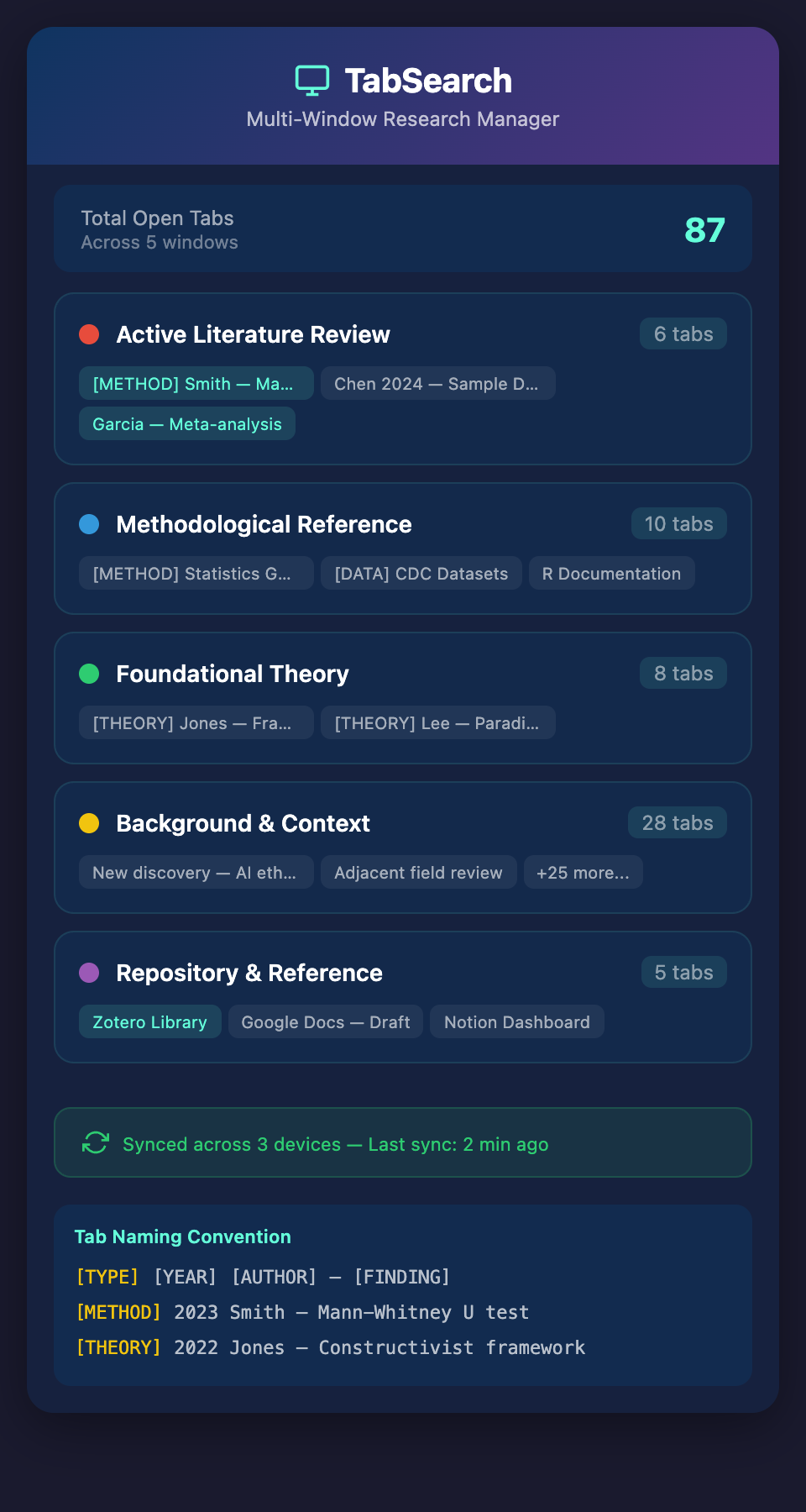
Window 1: Active Literature Review
Keep only your current research focus here. 5-8 tabs maximum. These are papers you're actively reading, comparing, or synthesizing. When you finish with a paper, close the tab or move it to Window 2.
Window 2: Methodological Reference
Open a second window specifically for method papers, dataset documentation, and statistical guides. These are your "how do I do this" resources. Typically 8-12 tabs here that evolve slowly.
Window 3: Foundational Theory
Keep your key theoretical sources here. These are papers you reference repeatedly and return to throughout your research. Since they change rarely, this window stays relatively static (5-10 tabs).
Window 4: Background and Context
New discoveries, adjacent fields, and exploratory reading. This is your highest-churn window where you add and remove tabs most frequently. It can safely hold 20-30 tabs because you're not context-switching between them as much.
Window 5: Repository and Reference
This window holds your reference management system in a tab (Zotero, Mendeley, or Notion database), your document-in-progress, and any organizational dashboards. Leave this window open throughout your session as your "hub."
Tagging and Annotation Within Tabs
With five windows and 50+ tabs, you need metadata beyond the page title. Implement this system:
Tab Naming Conventions
Right-click any tab and rename it (available in most browsers). Use a format:
[TYPE] [YEAR] [AUTHOR]—[FINDING]
Examples:
-
[METHOD] 2023 Smith—Mann-Whitney U test comparison -
[THEORY] 2022 Jones—Constructivist learning framework -
[DATA] 2024 CDC—COVID-19 demographic datasets
The brackets make scanning faster. You see the type immediately, which helps you know if this is a methods window or theory window before opening.
Color-Coded Windows
Use your browser's theme or use window-specific naming patterns to color-code them visually. Chrome allows you to theme each window differently. This becomes muscle memory: when you need methodological sources, you reach for the blue window.
Synchronization Across Devices
Research doesn't stay on one computer. You might open tabs on your laptop, then continue on your desktop at the office. Tab synchronization matters.
Modern browsers (Chrome, Firefox, Edge) synchronize tabs automatically if you're logged in. But synchronization only works for currently open tabs. Archive your inactive tabs to a shared document or reference manager daily. This serves double duty:
-
You have a permanent record across devices
-
You create decision points where you evaluate if each tab is still relevant
-
You force yourself to process the information rather than letting tabs accumulate indefinitely
Processing Your Tab Queue Weekly
Even with a perfect system, entropy increases. Implement a weekly tab review:
30-Minute Audit
Each Sunday evening (or your preferred day), spend 30 minutes processing tabs:
-
Go through each window
-
For each tab, ask: "Am I still referencing this? Is it central to my current research?"
-
If yes, keep it; if no, close it or save it to your reference manager
-
Reset your window count back to reasonable numbers
This isn't wasted time. This is synthesis time. During the audit, you're likely to discover connections between sources you hadn't noticed, realize you can close an entire line of research you've already processed, or identify gaps in your research that need filling.
The Evolution of Scale
Researchers who successfully manage 100+ tabs follow a progression:
Stage 1: Acceptance
You stop fighting the number of tabs. You admit you need a system designed for scale, not for 15 tabs.
Stage 2: Architecture
You design your browser windows by research function, not by random collection.
Stage 3: Automation
You implement capture and tagging systems so you don't have to manually organize every source.
Stage 4: Integration
You connect your reference manager, your tabs, and your writing environment so information flows without friction.
Looking Forward
The researchers managing their tab ecosystems most effectively aren't using better willpower or organizational obsession. They're using tools that integrate with their workflow rather than requiring them to shift between applications and windows constantly.
The next evolution removes the friction entirely: a system that indexes everything open in your tabs automatically, makes it fully searchable, and lets you capture the exact passages and context you need without breaking your research flow.
Ready to transform your research workflow? Join our waitlist to be among the first researchers who never lose a source again, manage thousands of references effortlessly, and focus entirely on the research itself.