Reducing Research Friction in Your Digital Workflow
The Friction Tax on Research
Researchers rarely account for friction, but it's pervasive.
Friction is the small cognitive and logistical cost of each task beyond the core work itself. Examples:
-
Switching between your reference manager and your writing app (3 seconds × 50 times daily = 2.5 minutes)
-
Searching for a paper you've already read but can't locate (5 minutes)
-
Typing the same citation twice because your tools don't talk to each other (2 minutes)
-
Deciding how to organize a new folder for a new source (1 minute)
-
Waiting for a PDF to download before you can read it (depends, but often 30 seconds)
Each instance is trivial. But researchers conduct hundreds of these micro-tasks daily. The cumulative cost is staggering.
Research shows that every time you context-switch (move between tools), you lose 10-25 minutes of productive thinking time, not just the switch time itself. So a 3-second switch between apps might cost 10 minutes of interrupted thinking.
A typical researcher might spend 2-4 hours per week on friction—not on reading or thinking, but on logistics and context-switching. That's 100-200 hours yearly: time that could be spent on actual research.
Identifying Your Friction Points
Before optimizing, audit where you lose time:
Track Your Research Day
Spend one full research day (4-6 hours) tracking how you spend time:
-
Deep research (reading papers, thinking, synthesizing)
-
Logistics (finding papers, organizing, managing files)
-
Administrative (emails, meetings, bureaucracy)
-
Meta-work (deciding what to do next, organizing, planning)
For every minute in "logistics" or "meta-work," note what caused it:
-
Searching for a file?
-
Switching between tools?
-
Deciding on organization structure?
-
Manually copying information?
Quantify Your Friction
Most researchers find that:
-
40-50% of time is deep research (ideal)
-
20-30% is logistics and administration (acceptable)
-
20-30% is friction and switching (problematic)
If you're spending 30% of research time on friction, that's the equivalent of losing 1 day per week to pure overhead.
Common Friction Points and Solutions
Friction 1: Tool Fragmentation
Problem: Your research uses five tools (browser, PDF reader, reference manager, notes app, writing environment). Every task requires switching.
Example journey:
- Find paper on Google Scholar → Click link → Download PDF → Switch to reference manager → Add citation → Write summary in notes app → Switch back to writing app to cite it → Wait for formatting
Time lost: 5-10 minutes per paper
Solutions:
Option A: Consolidate
-
Use a reference manager that's also your PDF reader (Zotero, Mendeley, Paperpile)
-
Use a notes tool that integrates with your reference manager (Notion, Obsidian with plugins)
-
Write in a tool that integrates citations directly (Overleaf, Notion, or tools with citation plugins)
Option B: Use Browser Extensions
-
Install extensions that reduce switching (Zotero connector, Hypothesis)
-
Save to your reference manager without opening it
-
Annotate web pages without leaving them
Time saved: 20-40 minutes weekly
Friction 2: Search Overhead
Problem: You can't find papers you've already read. You search Google Scholar (which shows everything), when you only need your own collection.
Example:
-
Remember reading a paper about "learning outcomes"
-
Search Google Scholar (get 100,000 results)
-
Spend 10 minutes narrowing results
-
Finally find the paper you read
Solution:
-
Train yourself to search your own archive first (not Google Scholar)
-
Use tags and ratings to surface your best sources
-
Create a "frequently referenced" list of your most important papers
Benefit: Find papers you've read in 10-20 seconds instead of 10 minutes
Time saved: 30-60 minutes weekly
Friction 3: Manual Data Entry
Problem: Information exists in multiple forms (PDF, web, notes) but you keep re-typing it.
Examples:
-
Copying citation information from a paper into your bibliography
-
Retyping key findings from a paper in your notes
-
Manual organization of files into folders
Solutions:
For Citations: Use tools with automatic metadata extraction
-
Zotero's browser connector automatically extracts full citation information
-
CrossRef lookup automatically fills in missing details
-
You rarely type citations manually
For Extraction: Use copy-paste and templates
-
Instead of retyping findings, copy key passages
-
Paste into a structured template
-
Add your annotations around the pasted text
For Organization: Use tagging instead of folders
-
Tag papers instead of filing them
-
Search by tag instead of navigating folders
-
Much faster than folder structures
Time saved: 45-90 minutes weekly
Friction 4: Waiting and Loading
Problem: Your tools are slow or require waiting.
Examples:
-
PDF takes 30 seconds to download before you can open it
-
Reference manager takes 10 seconds to launch
-
Syncing between devices takes a minute before you can work
Solutions:
Parallel Processing:
-
While a PDF downloads, open and read another paper
-
While your reference manager syncs, read a new source
-
Don't wait for one task to finish before starting another
Caching:
-
Keep frequently used PDFs in quick-access locations
-
Sync your reference manager overnight instead of on-demand
-
Cache common searches in your notes
Tool Selection:
-
Choose responsive tools over feature-rich ones when possible
-
Zotero is faster than Mendeley for most researchers
-
Plain text notes (Obsidian) search faster than database notes (Notion)
Time saved: 15-30 minutes weekly
Friction 5: Decision Fatigue
Problem: Too many choices about organization, process, tools.
Examples:
-
Deciding whether to organize papers by theme or methodology
-
Deciding if a paper is "high relevance" or "moderate relevance"
-
Deciding which tool to save something in
Solutions:
Standardize Your System:
-
Make decisions once, then follow them
-
Create a standard tagging system and stick to it
-
Create a standard folder structure and stop reorganizing
-
Use standard relevance ratings (1-5 scale, consistently applied)
Create Templates:
-
Standard note template (fill the same fields for every paper)
-
Standard file naming convention
-
Standard citation format
Time saved: 20-40 minutes weekly
Friction 6: Information Decay
Problem: You capture information that becomes outdated or inaccessible.
Examples:
-
A tab with important information you remember finding but can't locate again
-
A note about a paper without sufficient metadata to find it again
-
A bookmark to a website that later changed its URL
Solutions:
Comprehensive Capture:
-
When saving a source, capture: URL, date accessed, metadata, and your notes
-
Don't rely on URLs alone (capture content too)
-
Include context for why a source matters
Regular Maintenance:
-
Monthly review of recent captures; verify information is accurate
-
Quarterly backup of all your data
-
Annual purge of outdated or incorrect information
Time saved: Prevents 2-5 hours of lost research
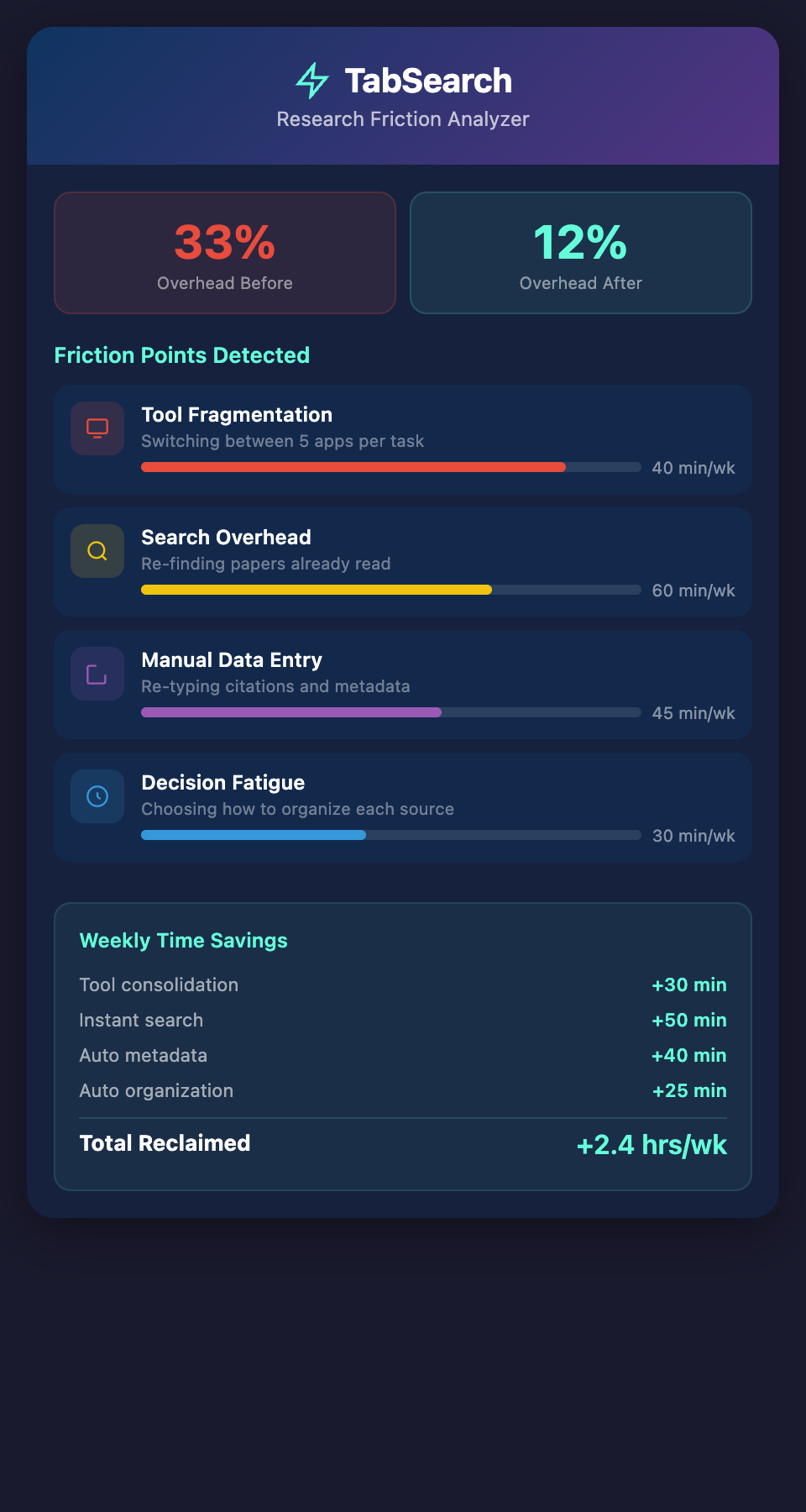
Measuring Friction Reduction
Track the impact of reducing friction:
Before optimization:
-
Time spent on logistics: 2 hours per week
-
Time spent on deep research: 4 hours per week
-
Ratio: 33% overhead
After optimization:
-
Time spent on logistics: 0.75 hours per week
-
Time spent on deep research: 5.25 hours per week
-
Ratio: 12% overhead
That's an extra 1.25 hours per week of actual research—60+ hours yearly.
The Compound Benefit
Small friction reductions compound over years. If your system is 20% more efficient:
-
1 year: 100 extra hours of research
-
3 years (dissertation): 300 extra hours
-
Career (30 years): 3,000 extra hours
That's roughly 5 months of full-time research saved.
Building Your Optimization Framework
Here's a systematic approach to friction reduction:
Step 1: Measure (1 day)
Track your time allocation for one research day. Where are the friction points?
Step 2: Prioritize (1 hour)
Which frictions take the most time? Start with the top 3.
Step 3: Optimize (1-5 hours depending on complexity)
For each top friction:
-
Test one solution
-
Measure the time saved
-
Keep it or try another solution
Step 4: Systematize (1 hour)
Once you've found solutions:
-
Write them down
-
Turn them into habits
-
Build them into your workflow
Step 5: Iterate (Quarterly)
Every 3 months, repeat the measurement. What new frictions have emerged?
The Unsolved Friction
Despite optimization, one major friction remains: switching between tools. Your reference manager doesn't know what you're writing. Your notes app doesn't know what papers you're reading. Your writing app doesn't know what sources you've captured. You're bridging these gaps through manual effort.
The ideal system would be unified: one environment where you search, read, annotate, take notes, and write—all interconnected, all indexed, all searchable.
Ready to eliminate research friction? Join our waitlist for early access to a tool that eliminates context-switching by integrating your entire research workflow into one seamless environment.